Server-side Google Tag Manager comes up in conversations about tracking as though everyone already knows what it means. Most people nod and look it up later.
This is the explanation without the jargon. What it is, how it actually works, what problem it solves, and whether your business needs it.
Why is browser based tracking becoming unreliable?
Because three separate forces have been eroding it at once: ad blockers refusing the requests, browser privacy restrictions shortening what can be stored, and the end of third party cookies removing the identifiers the whole model assumed.
For roughly two decades, web analytics worked one way. Your website loaded a small piece of JavaScript from Google, Meta, or whoever else, and that script ran in the visitor's browser and sent data back to those companies directly.
That model is eroding, for three reasons.
Ad blockers. A significant share of users run software that blocks requests to known tracking domains. When your GA4 tag tries to send data to Google's servers, the request never leaves the browser. The visit happened. Your analytics never heard about it.
Browser privacy restrictions. Safari's Intelligent Tracking Prevention, and similar features in Firefox and increasingly Chrome, limit how long cookies set by JavaScript can persist. In Safari, a cookie set by a script can be capped at seven days. Someone who visits, thinks about it for two weeks, and returns to buy looks like a brand new person.
Third party cookie deprecation. The identifiers that let advertising platforms recognize users across sites are being removed. This affects remarketing, frequency capping, and cross site attribution.
None of these are configuration errors. They are deliberate changes to how browsers work, and they are not being reversed.
What is client-side GTM and how does it work?
Client-side is the standard setup, and almost certainly what you have today. A snippet on your site loads the container in the visitor's browser, and every tag inside it sends data from that browser directly to each destination. Everything happens on the visitor's machine, which is why their browser's limitations become yours.
You place a small snippet of code on your website. When someone loads a page, that snippet loads the GTM container from Google's servers, in the visitor's browser. The container holds your tags, and each tag is a set of instructions saying "when this happens, send this data to this destination."
So when a purchase completes, the GA4 tag fires from the browser and sends data directly to Google Analytics. The Meta pixel fires from the browser and sends data directly to Meta. Each tag makes its own request from the visitor's device to a third party server.
The word "client" here just means the visitor's browser.
What is server-side GTM and how does it differ?
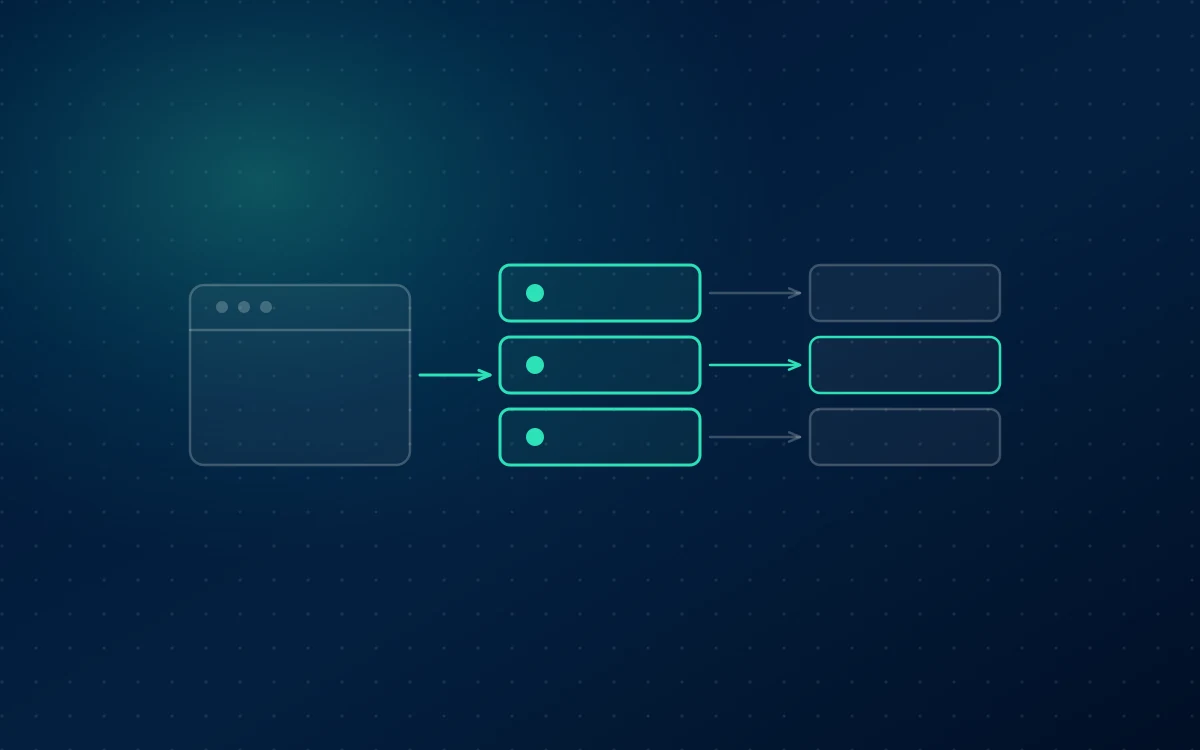
Server-side GTM adds a step in the middle. The browser sends data once, to a server you control, and that server forwards it on to each destination machine to machine. The container works the way you already know, with tags, triggers and variables. What changes is where it runs.
Instead of every tag sending data from the browser to a dozen third party destinations, the browser sends data once, to a server you control. That server runs its own GTM container, and from there it distributes the data to GA4, Google Ads, Meta, and anywhere else.
The important detail is where that server lives. It runs on a subdomain of your own website, something like data.yoursite.com. To the browser, requests to that address are first party traffic to the site the user is already visiting, not third party requests to an advertising company.
Two things follow from that.
Requests to your own subdomain are not on ad blocker lists, so they are far less likely to be blocked.
Cookies set by your server, rather than by JavaScript, are not subject to the same seven day cap in Safari. They can persist for much longer, which restores the ability to recognize a returning visitor.
The interface is the familiar one.
How does the data flow work?
Follow one purchase through each model and the difference is a single hop: client-side sends it from the browser to every destination, server-side sends it once to your own server and lets that server do the distributing.
Follow a single purchase through both models.
Client-side: the user completes checkout. The browser fires the GA4 tag, sending data to Google. It fires the Google Ads conversion tag, sending data to Google Ads. It fires the Meta pixel, sending data to Meta. Three separate requests from the visitor's device to three third party domains, each of which can be blocked, each setting its own cookies subject to browser restrictions.
Server-side: the user completes checkout. The browser sends one request to data.yoursite.com, which is your own infrastructure. Your server-side container receives that data. It then forwards to GA4, to Google Ads, and to Meta, from server to server.
The forwarding happens outside the browser entirely, so ad blockers and browser privacy features do not apply to it. The only request the browser makes goes to your own domain.
There is a further benefit that is easy to miss. Because the data passes through infrastructure you control, you decide what gets forwarded to whom. You can strip fields before sending to one platform and include them for another. In a client-side setup, whatever the tag collects goes wherever the tag sends it.
What problems does server-side GTM solve?
Five, and none of them are cosmetic: data lost to ad blockers, cookies cut short by browser privacy rules, conversion signal quality, page performance, and control over what leaves your infrastructure.
Ad blocker data loss. Requests to your own subdomain are not blocked in the way that requests to google-analytics.com are. Recovery varies by audience, and technical audiences with high ad blocker usage see the largest gains.
Cookie lifespan. Server set cookies persist beyond the browser imposed limits on script set cookies, so returning visitors are recognized and attribution windows work as intended.
Conversion signal quality. Sending conversions server to server through the Meta Conversions API or Google Ads Enhanced Conversions improves match rates, which improves what the bidding algorithms can learn.
Page performance. Loading one container instead of many third party scripts reduces the weight of your pages.
Data control. You decide what leaves your infrastructure, which matters for both privacy compliance and commercial reasons.
Do I need server-side GTM?
It depends on whether measurement gaps have started costing you money. Significant paid spend, GA4 numbers visibly below your backend, or Safari attribution problems all point to yes. Modest traffic and reporting nobody disputes point to not yet.
You probably need it if you spend significantly on paid media and conversion accuracy directly affects budget decisions, your GA4 numbers are visibly lower than your backend, you have noticed attribution problems affecting Safari users, or you are in a regulated industry where controlling what data leaves your systems matters.
You probably do not need it yet if your ad spend is modest, your current tracking reconciles reasonably with your backend, you have nobody who can maintain server infrastructure, or your client-side setup has known problems that server-side will not fix.
That last point deserves emphasis. Server-side GTM is not a repair for a broken container. If your current setup has duplicate tags, misfiring triggers, or missing conversions, moving it to a server preserves every one of those problems and adds hosting costs. Fix the client-side implementation first, then consider migrating it.
The realistic cost is a monthly hosting bill, either on Google Cloud or through a managed provider such as Stape, plus a meaningful implementation effort. For a business spending heavily on ads, recovering ten to twenty percent of conversion signal pays that back quickly. For a business spending modestly, it may not.
The plain summary
Server-side GTM moves your tracking from the visitor's browser to infrastructure you control, which makes it far more resilient to the ad blockers and privacy restrictions that are steadily degrading browser based measurement.
It is not a magic fix, and it is not for everyone. It is a considered upgrade for businesses where measurement accuracy has become a budget problem.
FAQ
What is server-side tagging in simple terms?
Server-side tagging means your website sends tracking data to a server you control instead of sending it directly from the visitor's browser to Google, Meta, and other platforms. That server then forwards the data onward. Because the request goes to your own subdomain, it is far less likely to be blocked, and cookies it sets last longer than browser set ones.
Is server-side GTM better than client-side?
It is more resilient, not universally better. Server-side reduces data loss from ad blockers, extends cookie lifespan, and improves conversion match rates. It also costs money to host and takes real effort to implement. For businesses with significant ad spend where accuracy affects budget decisions it is usually worth it. For smaller setups client-side remains perfectly adequate.
How much does server-side GTM cost?
You pay for hosting, either on Google Cloud or through a managed provider such as Stape. Costs scale with traffic, typically from a modest monthly figure for smaller sites to considerably more at high volume. Add implementation effort, which is usually the larger cost. Businesses recovering meaningful conversion signal generally see the hosting cost repaid quickly.
Does server-side tracking bypass ad blockers?
Partly. Requests go to your own subdomain rather than to known third party tracking domains, so they are much less likely to be blocked. It is not absolute. Some blockers use heuristics beyond domain lists, and a user who blocks all JavaScript is not tracked either way. The realistic outcome is recovering a substantial share, not all, of blocked data.
Do I still need client-side GTM if I use server-side?
Yes. The client-side container still runs in the browser and is what captures user interactions and sends them to your server container. Server-side does not replace it, it receives from it. Most implementations keep some tags client-side while routing the ones that benefit most, such as GA4 and conversion tags, through the server.
 Paid Media